
Writing with the AI content assistant
Use the built-in AI writing assistant to generate blog outlines, drafts, and SEO metadata, then edit the result before you publish.
Staring at a blank blog editor is the hardest part of publishing consistently. The built-in AI writing assistant helps you get from a topic to a working draft in minutes — an outline, an introduction, full body content, and even SEO metadata — which you then review and edit before publishing. This article covers how to use it well, and where to still apply your own judgment.
Where to find it
- Go to Sites > Blogs, and open or start a post.
- Inside the blog editor, look for the Ask AI panel.
Note: This feature is delivered through Labs and needs to be enabled for your account before it appears. If you don't see it, check your account's Labs settings, or contact whoever manages your platform setup.
Two ways to generate content
Assist mode (topic-based)
Give the assistant a topic and a few preferences — target word count, audience, and keywords you want covered — and it generates a complete draft: structure, body content, and SEO metadata together. This is the fastest path when you know what you want to write about but don't want to start from a blank page.
Build mode (custom prompt)
Write your own detailed instructions instead of just a topic — tone, structure, specific points to hit, examples to use. This gives you more control over the direction and voice of the output, at the cost of a little more setup time. Use this mode when the topic is nuanced, or when you have a specific angle you don't want the assistant to guess at.
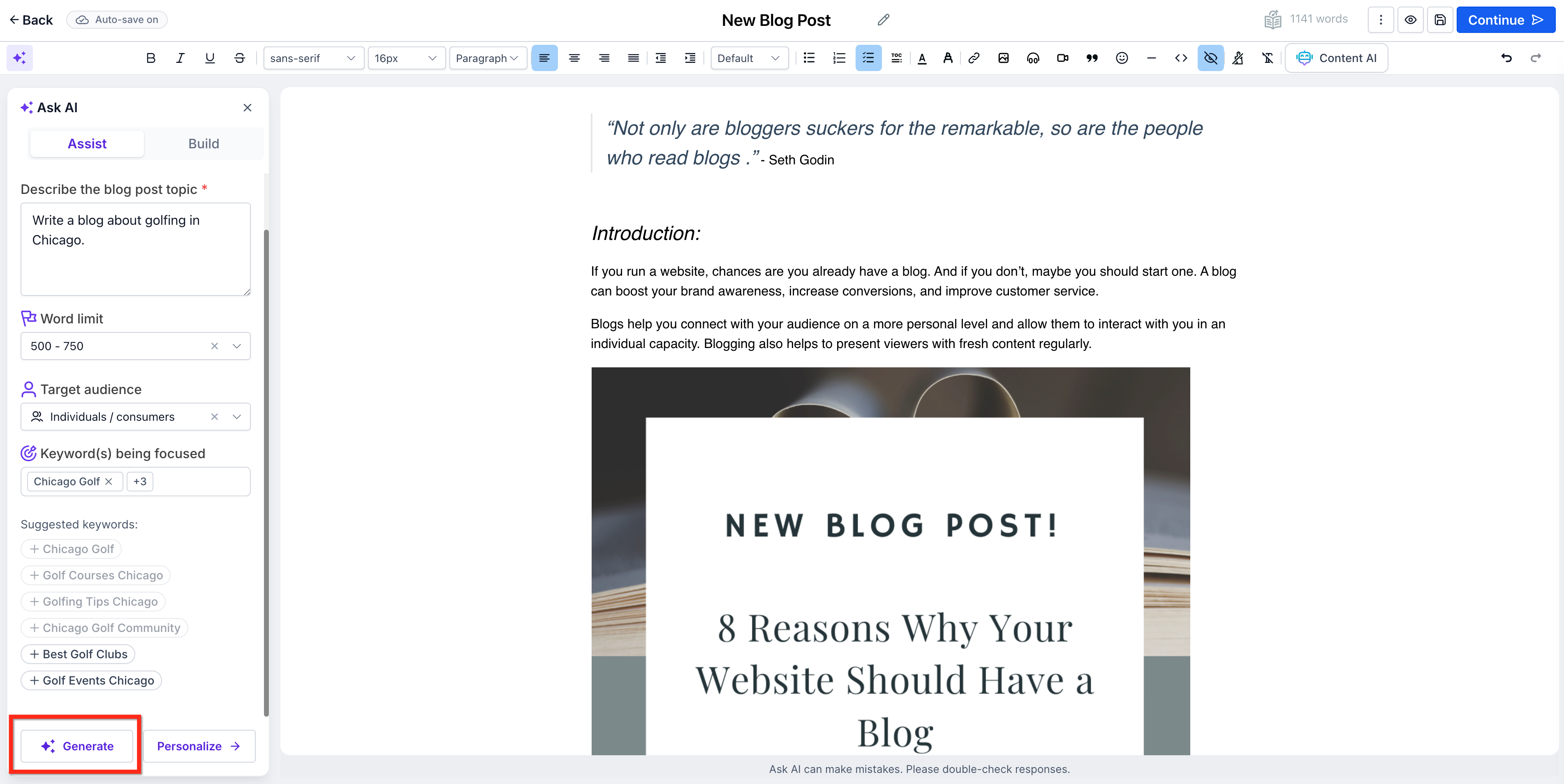
What it can generate
- Outline — bullet-point structure for the post, useful when you want to write the body yourself but need a starting skeleton.
- Introduction — a first paragraph that frames the article's main idea.
- A specific section — if you already have most of a post written and need help with one section, you can generate just that piece.
- Full draft — complete body content in one pass.
- SEO metadata — a suggested title, meta description, and keyword list based on the content.
- Images — AI-generated cover or in-post images, if you don't have your own on hand.
Editing and refining the output
Nothing generated should go straight to Publish. After you get a draft:
- Regenerate individual paragraphs you're not happy with, rather than the whole piece.
- Improve tone, clarity, or length on specific sections using the built-in refine options.
- Replace or regenerate images if the first pass doesn't fit your brand.
- Read the whole thing yourself, end to end, checking for accuracy. AI-generated content can state things confidently and incorrectly — verify any facts, statistics, product details, or claims about your own business before publishing.
- Make sure the voice actually sounds like you or your brand, not generic filler. Swap in specific examples, real customer language, or details only you would know.
Warning: Always fact-check AI-generated content before publishing, especially anything involving numbers, dates, pricing, or claims about your product or service. Treat the AI output as a strong first draft, not a finished article.
Multi-language support
The assistant can generate content in different languages, which is useful if you maintain versions of your blog for different audiences. Generate and review each language version separately — don't assume a translation carries the same nuance or accuracy as the original.
After generating: save, publish, or schedule
Once you're happy with the edited draft, the same publishing options apply as any other post — save as Draft, Publish immediately, or Schedule for later. See Create a blog and publish your first post for the full publishing workflow, and Blog post SEO to double-check the generated metadata before it goes live.
Blog writing best practices (with or without AI)
Whether you're writing from scratch or refining an AI draft, a few habits consistently produce better posts:
- Write for one reader, not everyone. A post trying to serve every possible visitor ends up serving none of them well. Pick a specific audience and speak to them.
- Lead with the payoff. State what the reader will get from the post in the first couple of sentences — don't bury it under throat-clearing.
- Break up long sections. Use subheadings every few paragraphs so the post is scannable, not just readable.
- Add your own specifics. Concrete examples, numbers, and screenshots from your actual product or process are what separate a genuinely useful post from generic content — this is also where AI tools fall short, since they can't know your specifics.
- Edit for length after, not during. Get the ideas down first, then cut anything that doesn't serve the reader.
What "done" looks like
You've used the assistant well when:
- The published post reads in your brand's voice, not like an obviously generic AI draft.
- Every factual claim, statistic, or product detail has been checked against a real source.
- The generated SEO metadata has been reviewed and adjusted to match your actual title and slug conventions.
- Images fit your brand, whether AI-generated or your own.
Related articles
- Create a blog and publish your first post
- Blog post SEO: titles, slugs, meta, and more
- Categories, authors, and organizing your blog
- Blogs overview: how blogging works on the platform
Frequently asked questions
Is the AI assistant free to use?
It's available as part of the platform, but generation is typically usage-based rather than unlimited. Check your account's billing or Labs settings for current usage details before relying on it heavily.
Can I use the assistant for just part of a post instead of the whole thing?
Yes. You can generate just an outline, just an introduction, or just one section — useful when you've already written most of a post and are stuck on a single part, rather than wanting a full draft.
Will search engines penalize AI-assisted content?
Search engines generally evaluate content on quality, accuracy, and usefulness to readers rather than how it was produced. The risk isn't that it was AI-assisted — it's publishing generic, unedited, or inaccurate content. Treat AI output as a draft to improve, and you avoid the actual problem.