
Order forms, upsells, and checkout pages in funnels
How to set up a funnel's order form step, connect products and payments, add one-click upsells, and build the thank-you page.
Selling directly through a funnel means building a checkout flow: an order form step that takes payment, optional upsell steps that increase the average order value, and a thank-you page that confirms the purchase. This covers how each piece works and how they connect.
The order form step
An order form is a funnel step type built specifically for taking payment, distinct from a standard content page.
- In your funnel's step list, add a new step and choose Order Form as the step type (or convert an existing step's type in its settings, if supported).
- Connect a payment provider — most accounts support Stripe and/or PayPal, configured once under your payment integrations and then selected per order form.
- Add the product(s) you're selling. Each product needs a name, price, and — for physical products — shipping details.
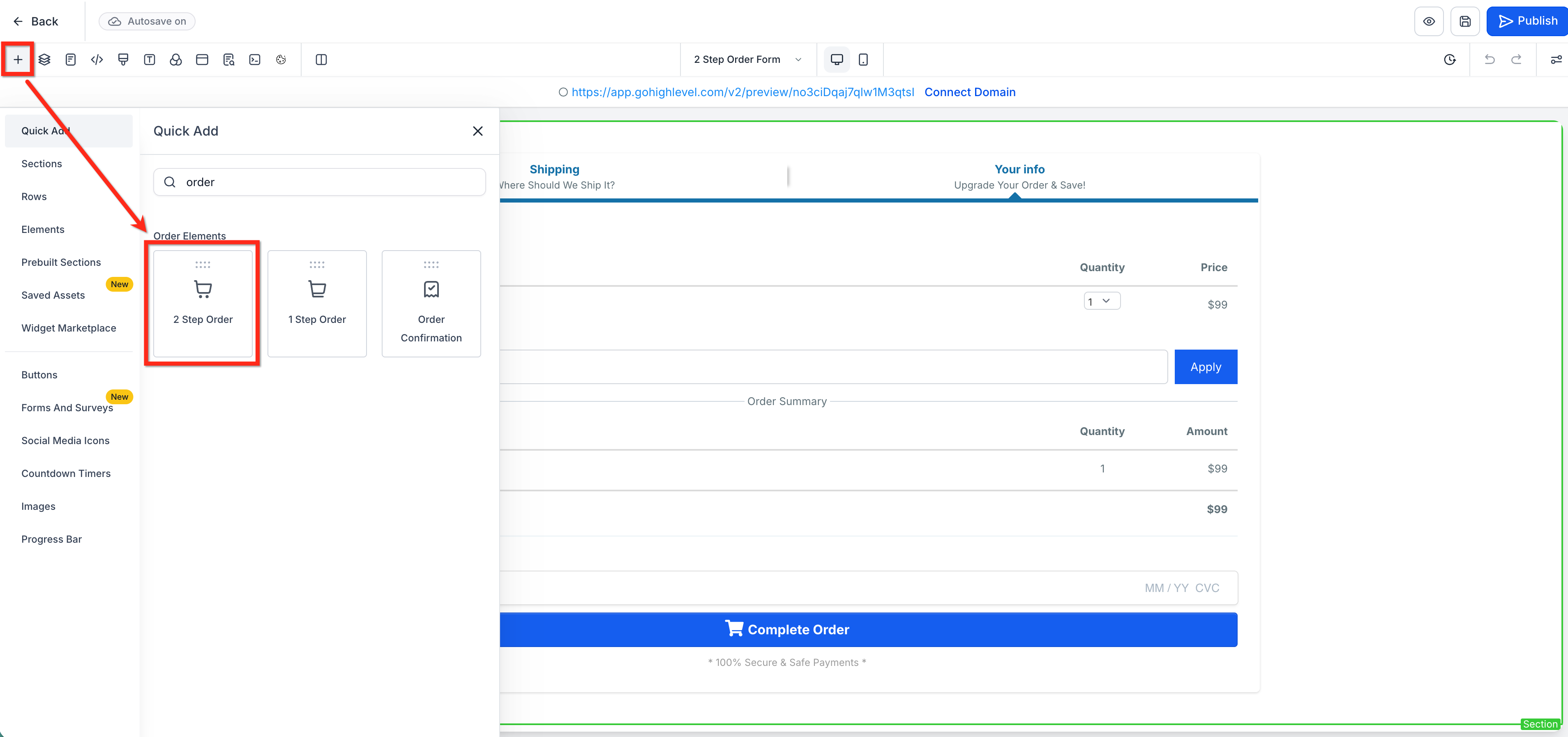
- Choose between one-step and two-step order forms:
- One-step puts contact info, shipping (if needed), and payment on a single screen.
- Two-step splits it: step one collects contact and shipping details, step two collects payment. Splitting the flow into a shorter first screen can reduce the friction of a long form and improve completion rates.
- Build the rest of the page around the order form element — headline, product description, testimonials, guarantee — everything a visitor needs to decide to buy, using the standard page builder.
Tip: Test every order form with a real transaction before sending traffic to it — most payment providers support a test/sandbox mode. Confirm the charge appears correctly in your payment provider's dashboard and that the funnel correctly redirects to the next step afterward.
Order bumps
An order bump is a small additional offer shown directly on the order form itself — a checkbox a visitor can tick to add a related product before they even complete checkout, without leaving the page.
- In the order form step's settings, look for a bump/add-on product option.
- Add the bump product, its price, and a short one-line description of the value it adds.
- Keep bump offers cheap, closely related to the main product, and genuinely useful — a bump that feels like an unrelated upsell tends to hurt trust rather than add revenue.
One-click upsells and downsells
After a purchase completes, you can present an upsell — a related, usually higher-value offer — without asking the customer to re-enter their payment details.
- Add a new funnel step after the order form step and set its type to Upsell.
- Connect the upsell product and price.
- Set the Accept button's destination — usually either another upsell step or the thank-you page.
- Set the Decline button's destination. This is commonly a downsell step (a lower-priced alternative for customers who weren't interested in the upsell price) or directly to the thank-you page.
- Build the upsell page content, keeping it focused — a single clear offer with a strong reason to add it, not a full sales page.
Order Form (purchase) → Upsell 1 (accept → Upsell 2, decline → Downsell)
                                        ↓ accept
                                  Thank-You Page
Note: Because upsells use the payment method already captured on the order form, they only work as a step immediately following a completed order form in the same funnel — you can't insert a one-click upsell in a funnel with no order form ahead of it.
Shopping cart mode
Some funnels sell multiple products at once rather than a single product per order form — a shopping-cart style checkout, where visitors can select quantities or multiple items before checking out in one transaction. If your order form needs to support more than one product being purchased together, check its settings for a cart mode option rather than trying to string together several single-product order forms.
The thank-you page
Every checkout flow should end on a dedicated thank-you page — never leave a customer staring at a blank confirmation or a generic message after paying.
- Add a final funnel step and set it as the destination for both the order form (if there's no upsell) and the last upsell/downsell step's outcomes.
- Confirm the purchase clearly: what they bought, what happens next (shipping timeline, access instructions, when they'll be contacted), and support contact info if something goes wrong.
- Consider adding a receipt or order summary element if your builder supports dynamically displaying the purchased product and price.
- This page is also a reasonable place for a tracking pixel that should only fire on a completed purchase — see Page settings and SEO meta for where to add tracking code.
What done looks like
Your checkout flow is ready to launch when:
- A real test transaction has gone through successfully on the order form and shows up correctly in your payment provider's dashboard.
- Every upsell and downsell step has both an Accept and Decline destination set — no step leaves a visitor with nowhere to go.
- Order bumps (if used) are cheap, relevant, and clearly described.
- The thank-you page confirms the purchase and sets clear expectations for what happens next.
- You've walked through the entire flow yourself, including declining an upsell, to confirm every path resolves correctly.
Related articles
Frequently asked questions
Can I offer more than one upsell in a row?
Yes — chain as many upsell steps as makes sense, each with its own Accept/Decline destinations. In practice, two is usually the point of diminishing returns; each additional upsell step adds another chance for a customer to abandon the flow.
What's the difference between an order bump and an upsell?
An order bump is added before checkout completes, on the same page as the main purchase, with no separate payment step. An upsell is offered after the initial purchase completes, on its own dedicated page, using the payment method already on file.
Do I need a two-step order form?
Not always — a short, simple offer often converts fine as a one-step form. Two-step tends to help more with longer forms (shipping address plus payment) where breaking it up reduces the form's apparent length.