
Draft and review product content
Improve one product with current source evidence, selective fields, and the correct storefront publishing workflow.
The Products workspace lets you compare store content with proposed enhancements before writing changes. Start with one Northgate ESD Packaging product so you can check every specification and understand which fields a publication will affect.
Before you draft
Confirm the account, storefront, and product identity. Similar packaging names may refer to different dimensions, materials, or variants. Use the product's stable identity and source information rather than choosing solely by title.
Have the approved product specifications available. An AI draft can help express an answer, but it cannot establish an unsupported shielding rating, size, certification, stock level, or delivery promise. Leave uncertain claims out until the responsible product owner supplies evidence.
Review a WooCommerce product
- Open AEO & Agentic Storefronts > Products.
- Use Needs attention, Drafts, or Published to find the appropriate group.
- Open the intended product.
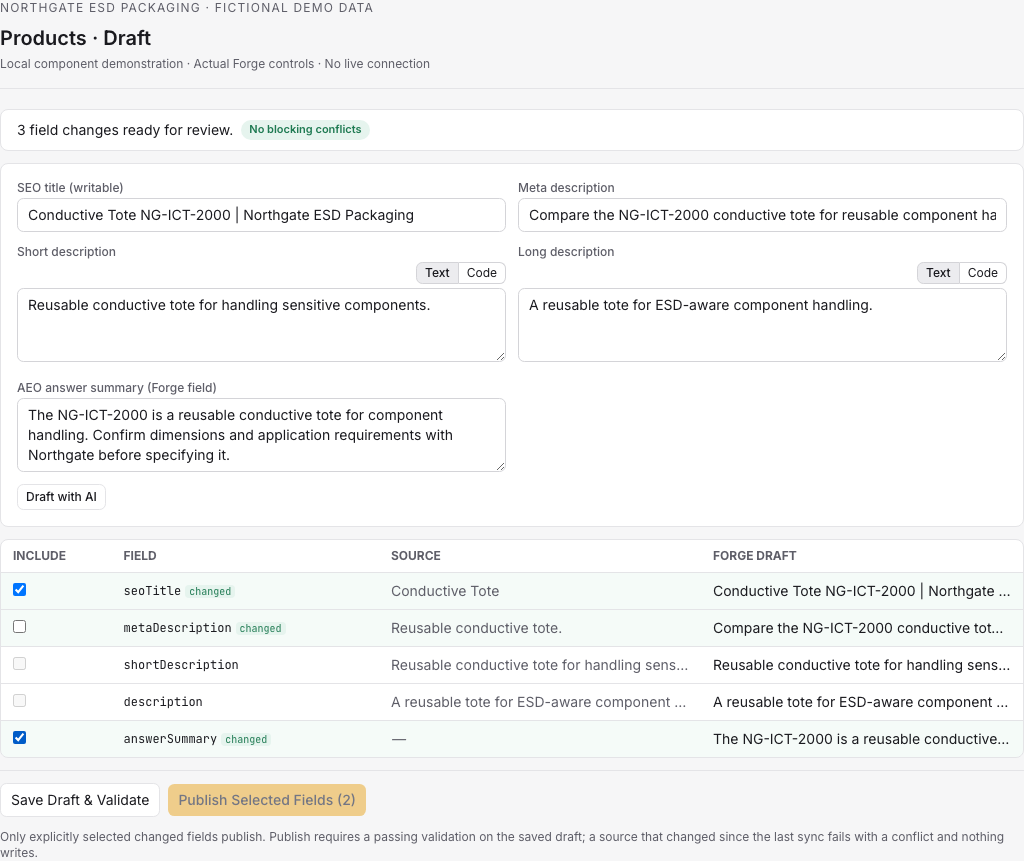
- Compare the Source and Forge draft values in the field table.
- Select the fields you intend to include.
- Save the draft and inspect its validation result.
- Review the complete selected changes before using the publish control.
Use filters when the list is large: validation, freshness, store status, and category help narrow the queue. A Stale source status is a reason to refresh and review, not to force the old draft through.
For Northgate, improve a description by explaining an approved use case and linking it to the correct quote process. Preserve accurate source wording that does not need changing. Selecting fewer, well-understood fields makes the review easier and reduces accidental replacement of unrelated content.
Understand the publishing boundary
WooCommerce supports guarded, selective field writes. Publishing requires passing validation and current source data. If the store changed after the draft's source snapshot, Forge blocks the write with a conflict. Re-scan, compare the new source, and save the revised draft before trying again.
A saved draft and a published result are separate states. After publishing, inspect the result and verify the storefront content. Do not assume a successful draft save changed the store.
Shopify uses different review surfaces. It supports inspection, drafts, exports, and review-gated metafield work; dedicated SEO write reviews prepare exact differences for supported SEO changes. Do not follow WooCommerce bulk publication steps for a Shopify store. Use the controls shown for the connected storefront and review the exact proposed fields.
Expand to bulk work carefully
When one product's workflow is understood, use Manage Bulk Drafts for eligible WooCommerce work. Export current source data, preserve the product identities, and import enhancements for review. The import checks rows individually; unknown, duplicate, cross-account, or stale identities are rejected.
Review the drafted and rejected totals. A partially successful import does not mean every row is ready. Correct the rejected rows using current source data, then inspect the review-and-publish selection. Keep a small related set together, such as a Northgate insert family, so the reviewer can spot inconsistent terminology.
Troubleshooting
If publishing is unavailable, check validation, source freshness, selected fields, and publishing permissions. If products fail to load, resolve the storefront connection issue before importing a replacement file. If a bulk import rejects identities, do not substitute titles as identifiers; use a fresh export.
If the draft sounds polished but changes a technical claim, correct the claim before publication. Validation checks structure and supported requirements; the product owner still reviews factual accuracy.
Your work is done when the intended fields have a clear result and the store shows the reviewed content. Improved answer-readiness is the outcome you can verify here; citations and visitor behavior require their own evidence.